RTC Bhoomi Online: Mutation Status and History: Mutation refers to the process of transferring property ownership from one person to another when the property is sold or transferred. In Karnataka, you can check the status of property mutation online through the Bhoomi Online Land Records Portal.
Check Mutation Status Village Wise
Step 1: Go to Bhoomi Online Official website: landrecords.karnataka.gov.in
Step 2: When you visit the official portal, go to the RTC Services section and choose the View RTC and MR option.

Step 3: You will get page like below, then select tab “Mutation Status“

Step 4: On the Mutation Status page, select your District, Taluk, Hobli, Village, Survey No., Surnoc No., and Hissa No. Then, click the Fetch Details button.

Final Step: As a result, your screen will display the Mutation Status, indicating whether it has been accepted or not, along with any remarks.
How to Check RTC Bhoomi Online Mutation History?
Step 1: To check your RTC Bhoomi Online Mutation Status, first go to the official landrecords.karnataka.gov.in page.
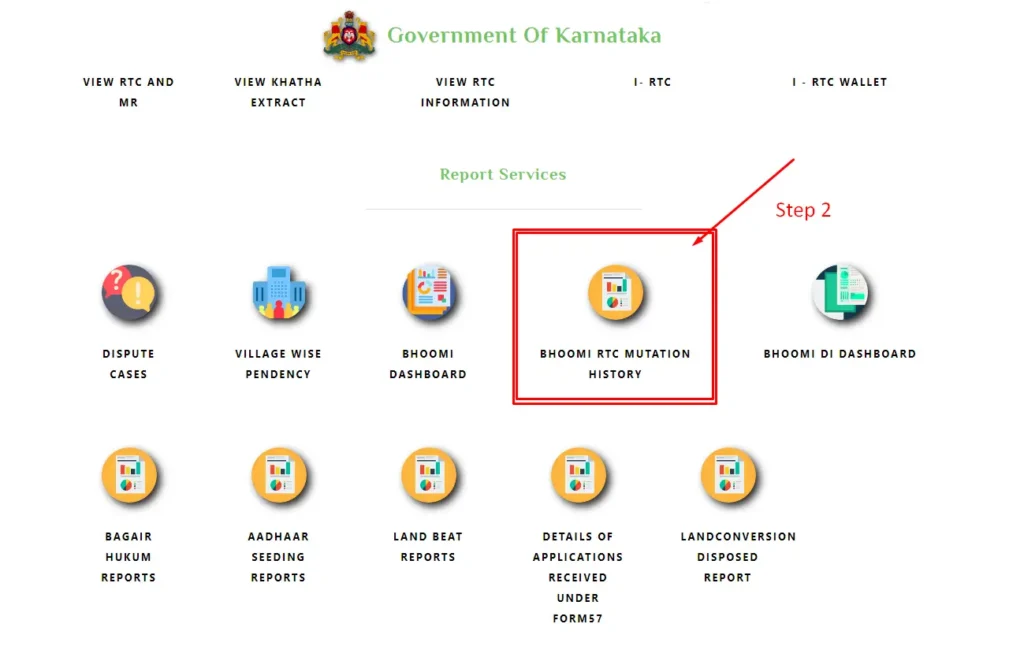
Step2: Once on the portal, navigate to the Report Services section and select the Bhoomi RTC Mutation History option.
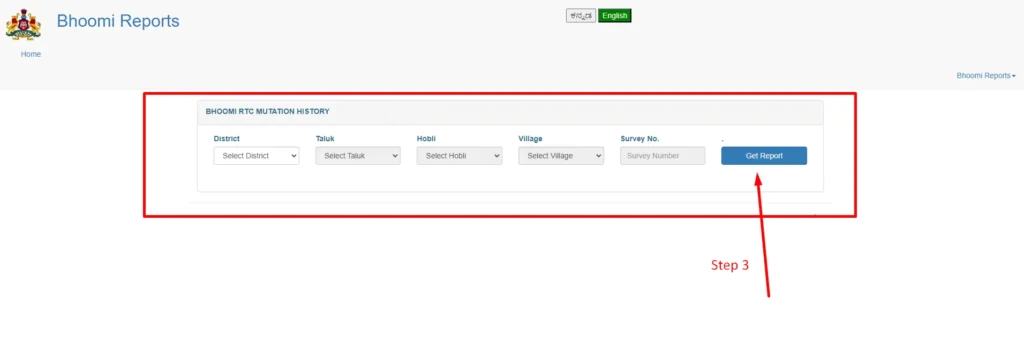
Step 3: Once you visit the Bhoomi RTC Mutation History page, select your District, Taluk, Hobli, Village, and Survey No. Then, click the Get Report button.

Step 4: As a result, your screen will display the Mutation History data, presenting all the details in a graphical report.
How to View RTC in the Karnataka Bhoomi Portal
To view RTC (Record of Rights, Tenancy, and Crops) online, follow these steps:
- Visit the Official Website: Go to the Karnataka Online Land Records Bhoomi portal at https://landrecords.karnataka.gov.in/.
- Navigate to View RTC and MR: On the homepage, click on the “View RTC and MR” option.
- Choose the Relevant Option: On the next page, you will see three options: Current Year, Old Year, and MR Mutation Status. Select the option that suits your needs.
- Fill in the Form: After selecting the desired option, a form will appear. Enter the necessary details, such as:
- District
- Taluk
- Hobli
- Village
- Survey Number
- Surnoc
- Hissa Number
- Period
- Year
- Submit the Form: Verify all the entered details and click on the “Fetch Details” button.
- View RTC: The land record details will appear on the screen. To view the RTC, click on the “View RTC” option. You can also save the RTC as an image file.
These steps will help you easily access RTC information through the Bhoomi portal.